4.7 How to Extend The Modelling Language
Extending the OLIVE modelling language allows you to go beyond the default features provided out of the box. This is particularly useful when you need to model custom behavior or integrate with systems that are not directly supported.
In this chapter, we will cover:
- The default extensions delivered with OLIVE
- How to use these extensions effectively
- How to create your own extensions for specific needs
Example Scenario
As a concrete example, we will look at creating an extension for SMTP mail sending. This will introduce the concepts of extensions in the modelling language and guide you through the steps of using and defining them.
This includes:
- Understanding extension concepts in the modelling language
- Reviewing default extensions available in OLIVE
- Creating your own custom extension
What We Learn
By the end of this chapter, you will know:
- Which extensions are already included (such as Agent, Prompt, MCP Server, …)
- How to use extensions in OLIVE
- How to write your own extensions to extend the modelling language
Introduction to Extensions in OLIVE
The OLIVE platform is designed to support extensions of its modelling language. Extensions provide flexibility when you need features that are not directly supported by the OLIVE Core. This can be valuable in several cases, for example:
- When a very specific technology is required but not common enough to be integrated into the OLIVE Core
- When you want to adopt new cutting-edge technology without waiting for a new OLIVE platform release
- When you frequently use a certain technology and want to expose it in a cleaner way (e.g. beyond the default HTTP datapoint)
For such cases, the OLIVE Extension mechanism is the right approach.
Current State
-
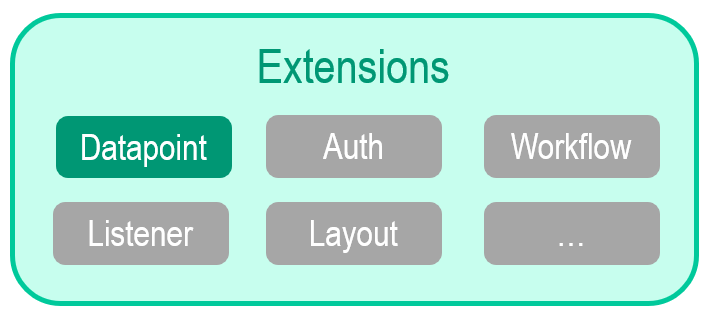
Currently, extensions are supported for Datapoint types.
- Example: Using a different protocol than HTTP.
Future Outlook
In the future, OLIVE will support additional extensibility points, enabling developers to extend more aspects of the platform:
- Auth: Add new authentication methods for broader security and compatibility
- Workflow: Register workflows for engines like AWS Step Functions or Conductor
- Listener: Add backend/frontend listeners for specific event buses and event types
- Layout: Define new client-side layouts to make the UI more flexible
- Others: Additional extension points may be added as the platform evolves
At this time, custom extension types cannot be formally registered with the OLIVE platform.
As a result, these types do not benefit from built-in validation or editor-assisted features such as schema validation and contextual hints.
Datapoint Extensions
Currently, the OLIVE platform supports the extension of Datapoint metamodel elements. By extending them, developers can create new types of datapoints that accept a tailored and more specific set of parameters.
This mechanism enables developers to:
- Add their own datapoint types
- Build services to handle these types
- Extend OLIVE with new protocols
Core Platform Support
The OLIVE platform provides built-in support for:
- HTTP
- CloudFunction (mostly used internally)
- Transform (simple JSON transformation)
- Manual Task
Provided Extension Datapoints
In addition, OLIVE delivers several predefined datapoint extensions out of the box:
- Prompt – Defines LLM access, selection, configuration, system prompt, and usage
- Agent – Defines an LLM-based agent (LLM configuration, prompt, tools)
- MCPServer – Defines which tools, prompts, and resources to provide
These extensions are delivered because they are part of OLIVE example use cases. While some (like Prompt) could be implemented with orchestrated HTTP calls, it is far more convenient to have them available as specialized datapoint types with specific implementations.
The AWSQuery datapoint extension is no longer supported from OLIVE Platform 1.3. Use an HTTP datapoint to query AWS services instead.
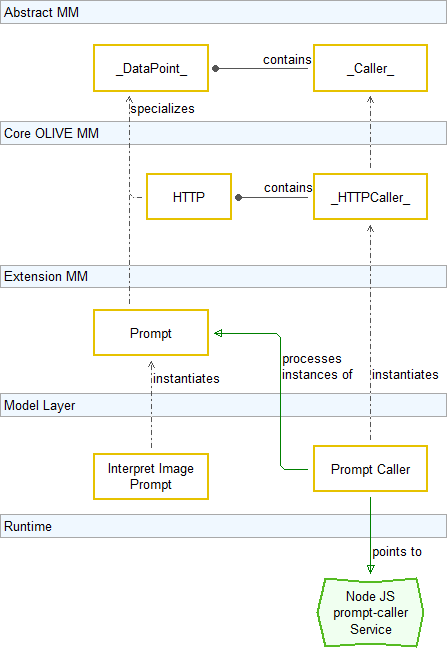
Metamodel & Caller Pattern
Extensions in OLIVE are defined within the Metamodel. At the abstract level, we have Datapoints, and to make them callable, they are paired with a Caller.
Core Implementation
In the OLIVE Core, there is one built-in specialization:
-
HTTP Datapoint → handled by HTTP Caller
- The
HttpCallerknows how to process datapoints of type HTTP and performs requests based on their parameters (URL, body, headers, etc.).
- The
Adding New Specializations
New types of datapoints can also be introduced:
-
Example: Prompt Datapoint → handled by a Prompt Caller
- Instead of sending a generic HTTP request, the
PromptCallerinterprets AI prompt parameters and forwards them to an LLM.
- Instead of sending a generic HTTP request, the
Role of Callers
To orchestrate new datapoint types, OLIVE core services must know which service handles them.
This is achieved by defining a Caller instance:
- Model Layer: e.g., Prompt Caller
- Runtime: e.g., Node.js prompt-caller Service
Developer Usage
Once the extension is defined, connectivity developers can create their own instances of the new type.
- Example: Interpret Image Prompt as an instance of the Prompt Datapoint type
Key Takeaway
This structure ties the abstract metamodel, the core built-in support, and extensibility with real runtime services.
Caller Pattern Example
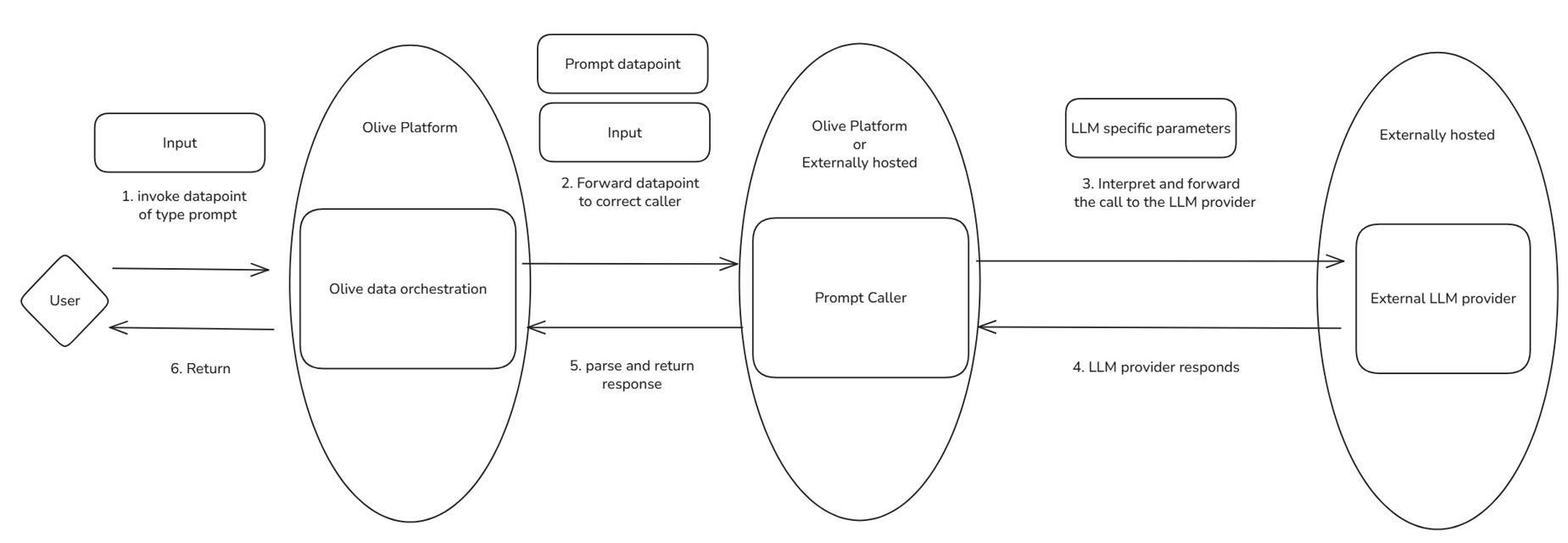
The diagram shows what happens when a datapoint of an extension type is invoked.
Step-by-Step Process
-
User Input
- A user invokes a datapoint of type Prompt.
-
Forwarding to Caller
- The OLIVE platform’s data orchestration determines which caller is responsible for this datapoint type and forwards the request.
-
Caller Processing
- The Prompt Caller interprets the request and transforms it into the correct format.
- It forwards the call to an external LLM provider, including all required LLM-specific parameters.
-
LLM Provider Execution
- The external LLM provider processes the request and responds with the output.
-
Response Handling
- The Prompt Caller parses the provider’s response and sends it back to the OLIVE platform.
-
Result Returned
- OLIVE delivers the final result back to the user.
Key Point
The Caller is a separate runtime application.
- For OLIVE’s default extensions, it may run within the OLIVE platform.
- For custom extensions, it can also be fully externally hosted as an independent service.
Why Introduce a New Extension?
In some cases, creating an extension is the only way to implement a solution — for example, when you need a protocol not yet supported by the OLIVE platform.
Even if not strictly necessary, extensions provide many advantages over relying on generic HTTP datapoints, especially in terms of simplicity, governance, and reusability.
While creating extensions can seem challenging at first, the benefits often outweigh the effort when they help reduce complexity and improve maintainability of your use cases.
Benefits of Creating Extensions
- Decouple from vendors: Avoid API lock-in and swap providers without rewiring
- Make concepts first-class: Capture domain specifics (e.g., Prompt) as typed, reusable assets
- Consistency & simplicity: One abstraction for config, invocation, and orchestration across backends
- Composability: Plug seamlessly into OLIVE core services
- Governance & security: Typed schemas enable validation, policies, and least-privilege authentication
- Observability & lifecycle: Built-in hooks for logging, metrics, versioning, and rollback
- Testability & portability: Use mock backends, run offline tests, and move across environments
- Future-proofing: Add new protocols/tools without waiting for a platform release
When to Create a New Extension
- You see a repeatable pattern not well expressed by existing types
- Multiple backends could implement the same functionality
- A new communication protocol or orchestration support is required
- Teams would benefit from reuse and reduced vendor dependency
Example "Prompt" - Why Introduce a New Extension?
When developing the first scenarios in OLIVE, one of the natural candidates for an extension was the prompt to large language models (LLM) use case.
In the Hello World example, we saw that it is perfectly possible to call an LLM (e.g., OpenAI) directly through HTTP requests. However, this approach has several downsides:
- The URL and endpoint are hardcoded to a specific vendor.
- The HTTP body structure is fully dependent on the vendor specification.
- The response format is returned as-is, without further abstraction or interpretation.
Example Challenge
This is exactly what happened in the chapters before this one. How to Start - Hello World called OpenAI with a plain HTTP datapoint, and that worked. Then How to Customize and Parametrize Connectivity offered the same scenario with Mistral instead, and the result was two datapoints that do the same thing — one per vendor — because each one carried its vendor's endpoint and request body in full:
| ChatGPT datapoint | Mistral datapoint | |
|---|---|---|
http.url | https://api.openai.com/v1/chat/completions | https://api.mistral.ai/v1/chat/completions |
http.body.model | gpt-5 | mistral-small-2503 |
datapoint.auth | the OpenAI token | the Mistral token |
| the prompt itself | identical | identical |
Three of those four rows are vendor plumbing. Only the last one is the thing you actually wanted to say. And because the plumbing lives inside the datapoint, swapping the model means swapping the whole element — which is why that chapter needed two connectivity patterns and a template step to choose between them.
Benefits of an Extension
A prompt datapoint moves the plumbing into the caller. What stays in the definition is the model, the
provider and the system prompt:
- Vendor-specific request and response formats are abstracted away — you do not write a chat-completions body or parse one.
- Only LLM-relevant configuration remains visible: which model, which provider, what the system prompt says, and the optional generation settings.
- The same
promptdatapoint type covers every supported provider, so the shape of the definition does not change when the provider does. - Switching provider becomes an attribute change rather than a new element.
Extensions: Prompt Extension
The Prompt extension introduces a new datapoint type (prompt) with its own set of parameters, replacing the generic http type. This allows working directly with LLMs in a simplified and structured way.
Key Differences
- Instead of a generic
httpdatapoint, you now declare apromptdatapoint. - Follow-up parameters are specific to prompt usage, not HTTP request structures.
Mandatory Parameters
All three sit inside datapoint.prompt:
| Field | Description |
|---|---|
provider | The service hosting the LLM. Supported values: openai, bedrock, sagemaker. An unrecognised value falls back to openai |
model | The specific model to use, for example gpt-5-nano or a Bedrock model ID |
systemprompt | The baseline instruction defining the model's role, behaviour and response style. A string, or an array of parts |
Helpful Optional Parameters
| Field | Description |
|---|---|
baseURL | Points the provider at a different endpoint — for a self-hosted model, or for an OpenAI-compatible API from another vendor |
region | For region-scoped providers such as AWS Bedrock |
expectJSON | When true, the response is expected and parsed as JSON instead of free-form text |
temperature | Randomness of the output. Low values give more deterministic answers, high values more varied ones |
placeholders | Values injected into the system prompt, each as { "placeholder": "...", "property": "..." } |
top_k, top_p, max_new_tokens, max_length, min_length, repetition_penalty | Generation settings passed through to the provider where it supports them |
provider accepts a custom identifier, and baseURL overrides the endpoint — so an OpenAI-compatible API
is reachable without a new extension. The Mistral example from
How to Customize and Parametrize Connectivity
becomes provider: "openai", baseURL: "https://api.mistral.ai/v1", model: "mistral-small-2503" — the
same datapoint shape as the ChatGPT one, with three attributes changed and no request body to write.
Authentication
- Prompt datapoints can use auth objects, storing provider-specific credentials (e.g., API keys).
Example Prompt Datapoint Definition
{
  "id": "base-dp-extract-concepts-prompt",
  "type": "datapoint",
  "version": "0.0.1",
  "name": "base-dp-extract-concepts-prompt",
  "displayName": "base-dp-extract-concepts-prompt",
  "tags": [
    "example",
    "simple-example",
    "scenario-example-base",
    "scenario-example-base-datapoints"
  ],
  "description": "Prompt datapoint that extracts subjects (class instances) and their relationships from an input text.",
  "deprecated": false,
  "datapoint": {
    "type": "prompt",
    "prompt": {
      "model": "gpt-5-nano",
      "provider": "openai",
      "systemprompt": "You receive a text. Extract subjects (class instances) and their relations to each other."
    },
    "auth": "base-a-bearer-api-key"
  },
  "owner": ""
}
Key Takeaway
This abstraction makes working with LLMs simpler, reusable, and vendor-independent, compared to manually handling HTTP calls.
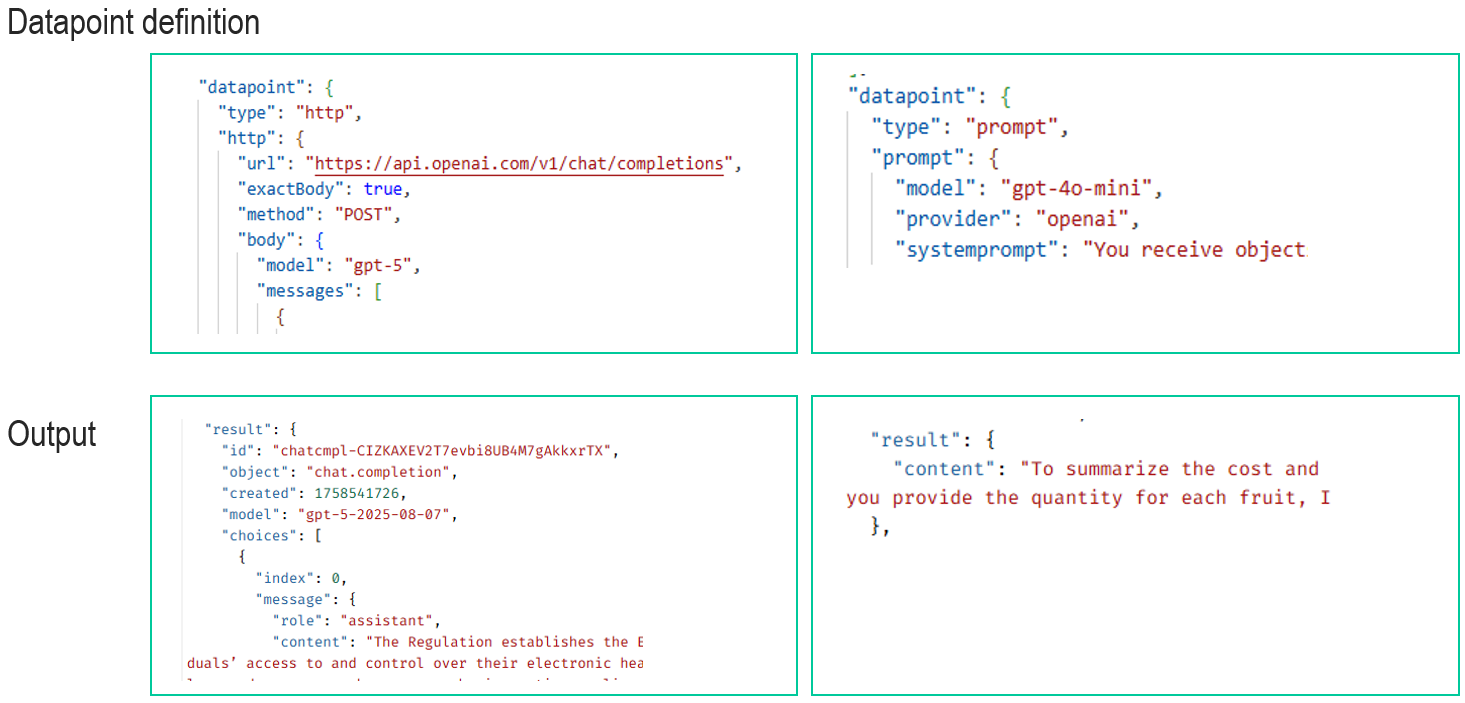
Prompt Extension: Comparison of HTTP vs Prompt Datapoint
When using OLIVE, you can either:
- Call an LLM directly via HTTP
- Use the specialized
promptdatapoint type
The difference lies in simplicity of definition and clarity of results.
Key Takeaways
- Simpler input → Only high-level, LLM-relevant parameters.
- Cleaner output → Direct response text, without unnecessary HTTP metadata.
- More reusable → Not tied to a single provider’s REST API.
Creating Extensions
Example: SMTP Extension
So far, we have looked at the theory of datapoint extensions and explored prompt extensions in more detail. Now, let’s walk through an example of how you could design your own extension.
In this case, we will discuss how to create an extension for sending emails using the SMTP protocol in OLIVE.
Why Use an Extension for SMTP?
- SMTP is not supported by default in OLIVE.
- Workarounds using HTTP would be more complex, harder to maintain, and prone to drawbacks.
Design Goal
Create a datapoint extension that allows OLIVE to send messages directly via SMTP, providing a cleaner, more reusable, and protocol-specific solution compared to generic HTTP calls.
⚠️ Note: This section is a conceptual walkthrough of the steps you would take to design such an extension. It is not a hands-on exercise, and you don’t need to implement or copy JSON structures at this point.
Steps to Create a New Extension (SMTP Example)
Creating a new extension in OLIVE can be broken down into three main steps:
-
Write your SMTP Service
- Implement the service that handles the actual processing of SMTP requests.
- This service will take care of sending content using the SMTP protocol.
-
Register the Caller in the OLIVE Repository
- Register your service as a Caller.
- Defining the caller also defines a new datapoint type (in this case,
smtp).
-
Create Datapoints Using the New Type
- Once the new type is available, you can create datapoints of type
smtp. - These datapoints can then be used in scenarios and workflows just like existing types.
- Once the new type is available, you can create datapoints of type
✅ With these steps, you extend OLIVE’s modelling language to cover a protocol not supported out of the box, making it reusable and cleaner compared to workarounds with HTTP.
Write Your Own SMTP Service
The first and most important step in creating a new extension is to write the actual service that will process the information and trigger the required actions.
What this involves:
-
Implement the Service
- Build a backend service that can handle the required task.
- In this case: send emails via SMTP.
- The choice of programming language or framework is flexible.
-
Deploy the Service
- Host the service on a provider such as AWS, another cloud vendor, or a custom server.
- Ensure the service is publicly accessible via HTTP.
-
Integration with OLIVE
-
When a datapoint of type
smtpis invoked, the OLIVE data orchestration forwards all necessary information to your service. -
The request includes:
- The datapoint definition from the repository (including custom properties).
- The input payload with which the datapoint was called.
-
-
Expected input — the request body your service receives:
{"datapoint": { ...the full definition of the datapoint that was called... },"input": ...the input the datapoint was invoked with...}datapointis the stored element exactly as it appears in the repository, including whatever custom properties you defined for your type.inputis whatever the caller passed, after placeholder resolution.
Key Reminder
- OLIVE’s default extensions run inside the OLIVE cloud platform.
- Your custom extension, however, may run externally (e.g., in AWS).
Register a Caller
After creating the backend service processing SMTP, the next step is to register it in the connectivity editor, so the OLIVE data orchestration knows that this extension exists.
This is done by creating an element of type caller. It carries two things: a datapoint block
describing how OLIVE reaches your service, and a caller block naming the datapoint types your service
is responsible for.
{
  "id": "base-ca-smtp-caller",
  "type": "caller",
  "version": "0.0.1",
  "name": "base-ca-smtp-caller",
  "displayName": "base-ca-smtp-caller",
  "tags": [
    "simple-example",
    "example",
    "scenario-example-base",
    "scenario-example-base-caller"
  ],
  "description": "Caller definition that registers an SMTP extension and describes how Olive can invoke the backend SMTP processing service via HTTP.",
  "deprecated": false,
  "datapoint": {
    "type": "http",
    "http": {
      "url": "https://your-smtp-service-endpoint",
      "method": "POST",
      "headers": {
        "Content-Type": "application/json"
      }
    }
  },
  "caller": {
    "supportsTypes": "smtp"
  }
}
Caller field reference
| Field | Type | Required | Description |
|---|---|---|---|
type | string | yes | "caller" |
datapoint | object | yes | How OLIVE invokes your service. For an externally hosted extension this is an http block with the service URL and method; OLIVE's own extensions use a cloudfunction block instead |
caller.supportsTypes | string | string[] | yes | The datapoint.type values this caller handles. A single type as a string, or several as an array — "smtp" or ["event", "jsAPI"] |
Registering the caller is what makes the type usable: from then on, a datapoint whose datapoint.type is
smtp is routed to this service.
If no registered caller claims a datapoint's type, the orchestrator logs a warning and falls back to
treating the element as a plain JSON datapoint rather than failing. A datapoint that returns its own
definition instead of calling anything usually means its type is not claimed by any caller — check that
the caller element exists and that supportsTypes matches exactly.
Register a Datapoint
After registering the caller, the OLIVE data orchestration now knows that the datapoint type "smtp" exists and we can create datapoints with this type. The actual parameters needed for smtp can be any kind of arbitrary JSON properties, the smtp backend service itself has to decide which properties it will expect from the datapoint and how to interpret them.
{
  "id": "base-dp-smtp",
  "type": "datapoint",
  "version": "0.0.1",
  "name": "base-dp-smtp",
  "displayName": "base-dp-smtp",
  "tags": [
    "example",
    "simple-example",
    "scenario-example-base",
    "scenario-example-base-datapoints"
  ],
  "description": "SMTP datapoint instance using a custom 'smtp' datapoint type. The smtp backend service determines which properties it expects and how to interpret them.",
  "deprecated": false,
  "datapoint": {
    "type": "smtp",
    "smtp": {
      "url": "smtp://tenant-specific-smtp-server",
      "port": "25",
      "tls": false
    },
    "auth": "base-a-bearer-api-key"
  },
  "owner": ""
}
Future Support for Auth
So far, only extensions for Datapoint types are supported in the OLIVE platform. However, another clear candidate for extension support is Auth types.
Current Authentication Specializations
At present, OLIVE supports a set of common authentication mechanisms:
- BasicAuth – simple username + password authentication
- Bearer – token-based authentication
- OIDC – OpenID Connect authentication
- OAuth2 – OAuth 2.0 authentication
These cover the most commonly used methods for HTTP APIs and integrations with major providers.
AWSv4 (AWS Signature v4) authentication is no longer supported from OLIVE Platform 1.3.
Why Extend Auth?
Future support for Auth extensions would allow connectivity developers to:
- Register custom or evolving authentication methods introduced by new systems and APIs.
- Adapt quickly to security and protocol changes in their environment.
- Integrate with a wider range of services without waiting for a core platform update.
Current Status
- Auth extensions are not yet supported in OLIVE.
- Planned future improvements aim to make Auth as extensible as Datapoints, empowering developers with more flexibility.
Lessons Learned
In this chapter, we learned the fundamentals of extensions in the OLIVE platform and how they expand its flexibility and power.
-
Basics of extensions – what they are and how they work in OLIVE.
-
Default extensions – the ones provided out of the box, including a closer look at the Prompt extension.
-
How to use an extension – applying existing ones in your scenarios.
-
How to create your own extension – designing and registering a new type.
- Example: SMTP extension to support sending mail.
Extensions are a powerful mechanism to:
- Simplify integration with external services
- Introduce new capabilities without waiting for platform updates
- Reuse and standardize functionality across use cases