8 Roles In OLIVE
It is essential to understand the different roles that exist within the OLIVE platform. These roles define how individuals interact with OLIVE, what responsibilities they carry, and how they contribute to the overall operation of the platform.
Connectivity Scenario Developer
The first role we will discuss is the Connectivity Scenario Developer.
Activities
- Register datapoints within OLIVE
- Model connectivity between systems and services
- Publish scenarios that can be reused by other tenants
These developers are the content creators in OLIVE — building datapoints, connectors, and reusable templates that form the foundation of new use cases.
Tools
OLIVE provides Connectivity Scenario Developers with the core tooling to model, manage, and publish connectivity scenarios.
- Public APIs to register, update, and execute datapoints, connectors, and scenarios
- A connectivity editor to create and CRUD JSON-based definitions
- A scenario template interpreter to instantiate reusable, parameterized templates
Required Knowledge
To succeed in this role, a developer needs:
- Strong understanding of OLIVE platform concepts
- Knowledge of the Connectivity Metamodel
- Familiarity with development practices for building scalable and reliable connectivity solutions
- Proficiency in JSON syntax, since use cases are defined and registered in this format
Security Responsibilities
Connectivity and UI component code runs inside OLIVE's trust boundary: connectors execute with the platform's outbound reach and can be invoked by privileged users, and microfrontend components execute in an authenticated user's browser session. Neither is contained the way ordinary application input is, so part of this role is security work:
- Keep credentials out of definitions and out of bundles. Reference secrets from the platform's secrets management instead.
- Do not design connectivity that requires an administrator to execute it. Connectivity runs with the permissions of whoever runs it — see Security in Connectivity Engineering.
- Have code security-reviewed before it reaches a production deployment, by someone other than its author. The Tenant Admin reviews it too, as a second line of defence rather than a replacement.
- Own your dependencies. Pin them, audit them, and keep the tree small — for custom services and for UI components alike.
- Follow the UI component checklist before handing a pilet over: Client Microfrontends → Your Security Responsibilities.
Additional Notes
- Developers may also create custom services and register their datapoints in OLIVE.
- However, it is important to note that OLIVE itself does not build or deploy these custom services — the responsibility remains with the developer, including its security.
Key Takeaway
The Connectivity Scenario Developer is the backbone role in OLIVE, enabling integration by creating and publishing reusable building blocks for others.
Operator Role
Another key role in the OLIVE ecosystem is the Operator. Unlike the Connectivity Scenario Developer, the Operator is not concerned with building or publishing use cases. Instead, their responsibility lies in managing and maintaining the underlying OLIVE platform itself.
Activities
Operators are responsible for:
-
Setting up, managing, updating, and maintaining the OLIVE environment
- Cloud distribution (e.g., Kubernetes clusters), including resources, scaling, and networking
- Common infrastructure components such as HashiCorp Vault, Keycloak, ArgoCD, Cert-Manager, and similar tools
- The OLIVE platform as a whole, including onboarding and offboarding tenants
Required Knowledge
To perform their duties effectively, Operators need:
- A solid understanding of cloud-native technologies
- Hands-on knowledge of key infrastructure tools such as Vault, Keycloak, ArgoCD, and Cert-Manager
- Strong familiarity with Kubernetes administration and day-to-day platform operations
Distinction from Other Roles
- Operators do not interact with or create repository content in OLIVE.
- They are not expected to know the Connectivity Metamodel or to design connectivity solutions.
- Their focus is on platform health, security, and stability, rather than on content development.
Key Takeaway
The OLIVE Operator ensures that the platform is running, providing the foundation for scenario developers and end users.
As a connectivity engineer you will be told to "ask your administrator" in several places in this handbook. Which one depends on what has to change:
| Ask the | When the thing to change is |
|---|---|
| Tenant Admin | Inside one tenant: importing a bundle, client credentials, user roles, reviewing a pilet or a connector before it is enabled, which tenant holds shared assets |
| Operator | The deployment itself: anything in values.yaml, the scheduler's cadence, enabling the Temporal Web UI, trusting an internal CA, registering an internal destination with the egress guard |
Connectivity User Role
The third role in the OLIVE ecosystem is the Connectivity User. Unlike developers or operators, this role focuses on using the connectivity scenarios and applications that have already been created and onboarded.
Activities
Connectivity Users are responsible for:
- Consuming and using connectivity applications onboarded by the Tenant Admin
- Interacting with OLIVE-based solutions either through a user-friendly interface or via APIs
Capabilities
OLIVE provides Connectivity Users with access to connectivity functionality.
- Public APIs to consume and trigger connectable elements
Required Knowledge
This role requires only a basic understanding of how to access and use OLIVE applications.
- For non-technical users: this could mean simply working with a Microfrontend built in OLIVE
- For technical users: it could mean calling datapoints and connectors from their own applications via OLIVE’s public APIs
Distinction from Other Roles
- Connectivity Users are the end consumers of OLIVE scenarios
- They do not create datapoints or connectors (Scenario Developers do that)
- They do not maintain infrastructure (Operators handle that)
- Instead, their main task is to make use of the functionality exposed to them, in ways that suit their business or technical needs
Key Takeaway
Connectivity Users are the final link in the chain, bridging OLIVE’s technical capabilities with practical, everyday use.
Tenant Admin Role
The Tenant Admin plays a central role in managing access and ensuring that connectivity scenarios are properly onboarded and made available to users within their organization.
Activities
Tenant Admins are responsible for:
- Providing access to connectivity users in a self-service manner
- Onboarding published scenarios so that they can be consumed by connectivity users
- Managing integration with IAM systems to align with customer-specific security policies
Capabilities
OLIVE provides Tenant Admins with capabilities to configure and govern connectivity scenarios and access within a tenant.
- Scenario Template Interpreter to instantiate published templates for a specific tenant
- Integration with Identity & Access Management (Keycloak) to manage users, roles, and access rights
Required Knowledge
- A solid understanding of user management, especially in enterprise environments
- Familiarity with published scenarios in OLIVE and the ability to configure and enable them for end users
- Depending on context, a Tenant Admin may also need deeper knowledge of Identity and Access Management (IAM) tools
Role in Context
- This role is often taken on by key account managers or responsible customer-side administrators
- It acts as the bridge between organizational requirements (e.g., access rights, IAM integration) and OLIVE’s technical capabilities
- While Tenant Admins do not typically create datapoints or connectors themselves, they ensure that the right people have access to the right scenarios in a secure and managed way
Key Takeaway
Tenant Admins ensure that OLIVE connectivity scenarios are delivered and accessible, adapting them to the needs of the specific tenant environment.
Platform Permissions: user, editor and admin
The roles above describe what people do. OLIVE also has three technical permission levels that the platform enforces, and from OLIVE 1.3 they are genuinely different permissions rather than three names for the same set.
| Permission level | Keycloak realm role | May |
|---|---|---|
| user | none | Execute connectivity, read what they are entitled to |
| editor | editor | Additionally create and change connectivity definitions |
| admin | admin | Administrative functions, including importing an OLIVE Connectivity Bundle — but not ordinary editing functions |
The mapping to the roles described on this page is the obvious one: a Connectivity User holds user, a Connectivity Scenario Developer holds editor, and a Tenant Admin holds admin.
The two sets barely overlap: an editor creates and changes connectivity and can export a bundle, but cannot import one; an admin can import, but cannot use the ordinary editing functions. The split follows what the action does: exporting reads, so an editor may do it; importing writes into a live tenant and can overwrite existing elements, so it is reserved to an admin.
In practice this means the handover at the end of a project is a real handover: a Connectivity Scenario Developer builds and exports the solution with the editor role, and a Tenant Admin — holding admin — imports it into the target tenant. The engineer packages their own work; only the last step changes hands. See How to Package a Use Case Solution.
Before 1.3, all three levels mapped to the same underlying permissions, so the distinction existed in the interface but not in enforcement. It is now enforced. In particular, an editor can no longer clear data that should be admin-only, overwrite protected core connectivity entries, or read internal core entries by setting a debug flag.
If an automation relied on an editor holding administrative permissions, assign it the correct role rather than working around the check.
Content only an admin may change
Two kinds of content sit on the admin side of that line, even though they look like ordinary content in the editor:
- Connectivity entries tagged
core— the entries delivered with the foundational package. They are hidden in the editor unless it is opened with the URL parameterdebug=true. They define how OLIVE's own services behave, so changing one does not change your solution — it changes the platform underneath every solution in that tenant. Editing them was an editor function before 1.3 and is an admin function now. In normal work nobody needs to touch them; if you believe you do, ask your Tenant Admin — it is usually a sign that the behaviour you want belongs in your own connectivity instead. - Pilets (UI components) — deploying or changing one in a production deployment requires admin, because a pilet runs in an authenticated user's browser session and is therefore treated as an administrative change rather than as ordinary connectivity content. You build and test pilets in a development deployment, then hand them over — see Client Microfrontends.
In a development deployment there are no roles at all: a single user holds every permission, so both are freely editable there. That also means the restriction is invisible until you move to production, where the same action is refused unless you hold the admin role.
Holding both editor and admin
A person may hold both editor and admin. OLIVE permits it, because forbidding it would make small-team and development setups impractical, but it should be avoided: the two roles are separate precisely so that writing connectivity and administering a tenant are different acts. Least-privilege guidance is to separate them, and to hold them as two accounts rather than one where the organisation can afford it. Whether your organisation allows the combination is a policy decision for the Tenant Admin.
Every privileged operation is checked in one place and recorded in the security log on both success and denial, so a permission problem is visible rather than a silent partial failure.
How these permissions are configured in Keycloak is described in Roles and Permissions. What they mean when you build and run connectivity — in particular why connectivity should not be executed with an admin account — is described in Security in Connectivity Engineering.
Multiple Roles
In practice, the boundaries between roles are not always strict. A single person may take on multiple roles within the OLIVE ecosystem, depending on the size of the team, the organization’s setup, or project-specific needs.
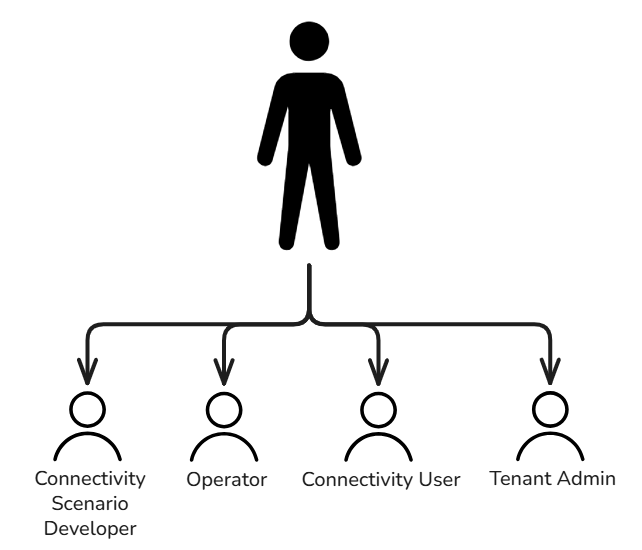
Key Points
-
One person, multiple roles
- It is common for individuals to cover more than one responsibility in OLIVE.
-
Examples:
- A Connectivity Scenario Developer might also act as the Tenant Admin for a specific tenant.
- An Operator may additionally take on the Tenant Admin role in smaller organizations.
-
Flexibility
- This flexibility enables organizations to adapt OLIVE to their resources and operating model.
- However, when one person holds multiple roles, it is important to ensure clear separation of responsibilities and secure role management.
-
Combining roles has a security cost
- Combining editor and admin permissions in one account is permitted by the platform but discouraged — see Holding both editor and admin.
Key Takeaway
While OLIVE defines four distinct roles (Scenario Developer, Operator, Connectivity User, Tenant Admin), in practice, individuals may combine these roles depending on organizational requirements.
Which roles apply depends on the kind of deployment. A development deployment has one tenant, no users and no authentication, so there is nothing for a Tenant Admin to administer and that role does not apply there. Because connectivity is developed, provided and used in the same namespace, the remaining roles are held by the same person in practice — a Connectivity Scenario Developer is also the Connectivity User who tries the result.
A production deployment has tenants, users and enforced roles, and the separation becomes real. See Development and production deployments.