6.10 Scheduling Execution of Connectable Elements
You can configure the periodic execution of a connectable element—such as a DataPoint, Connector, or Workflow—by creating an instance of a ScheduledTask.
The OLIVE platform evaluates scheduled tasks every two minutes. If a task is due at the time of evaluation, the referenced connectable element is executed according to the task configuration.
For authenticated production deployments the olive-gateway client (see also: Accessing OLIVE APIs in Production Environment Deployments) with the role "editor" is being used to execute the scheduled task.
As a consequence of this execution model:
- The minimum supported execution interval for a ScheduledTask is two minutes.
- Cron expressions that define intervals shorter than two minutes are not supported and may lead to unexpected behavior.
- APIs that require the admin role cannot be scheduled, because the scheduler runs as the
olive-gatewayclient, which holds the editor role.
Adding the admin role to olive-gateway would make every scheduled task in the deployment run with
administrative permissions, not just the one that needs it. That is the pattern described in
Do not execute connectivity as an administrator,
applied to every task at once.
If a scheduled task genuinely needs an administrative operation, raise it with your Tenant Admin rather than widening the scheduler's role — in most cases the work belongs in an administrative procedure rather than in scheduled connectivity.
The two-minute evaluation interval is not fixed in the platform — it is the cadence of a Kubernetes CronJob that your OLIVE operator configures per deployment (schedule-trigger-cron-job, the "metronome"). Two minutes is the default. Three consequences for you as a connectivity engineer:
- An operator can set the cadence slower — hourly, for instance. A
cronExpressionof*/2 * * * *against an hourly metronome runs hourly, not every two minutes. If the timing of a task matters, confirm the deployment's trigger cadence rather than assuming two minutes. - An operator can pause the trigger. While it is paused, no scheduled task runs anywhere in that deployment, and nothing in the task configuration or the UI indicates it.
- A task that never fires is often a platform-side trigger problem, not a problem with the task. Ask your OLIVE operator to check the trigger's recent runs before reworking the
cronExpression.
Example
The following example executes a defined DataPoint every two minutes, using the payload { "test": "yes" } as input.
{
  "id": "base-st-scheduled-dp",
  "version": "1.0.0",
  "type": "scheduledTask",
  "name": "base-st-scheduled-dp",
  "displayName": "base-st-scheduled-dp",
  "tags": [
    "simple-example",
    "example",
    "scenario-example-base",
    "scenario-example-base-scheduledTask"
  ],
  "scheduledTask": {
    "active": true,
    "element": "{your-datapoint-id}",
    "cronExpression": "*/2 * * * *",
    "payload": {
      "test": "yes"
    }
  }
}
Configuration Properties
| Property | Type | Description |
|---|---|---|
active | boolean | Enables or disables the automatic periodic execution of the scheduled task. Set to true to activate the task, or false to deactivate it. |
element | string | The identifier of the connectable element (DataPoint, Connector, or Workflow) to be executed. |
cronExpression | string | A cron expression that defines the execution schedule. The effective execution interval must not be less than two minutes, as the platform evaluates scheduled tasks at two-minute intervals. |
payload | object | The input data passed to the connectable element when it is executed. |
Cron Expression
The cronExpression defines when a ScheduledTask is executed. OLIVE uses a five-field cron format:
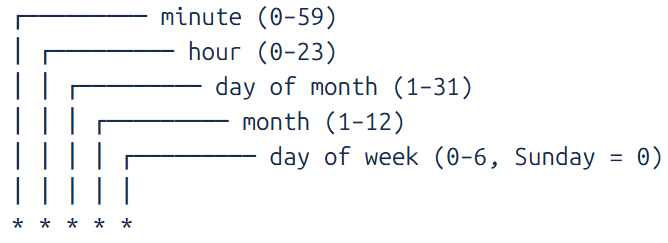
Supported Syntax
*— all values,— multiple values (e.g.0,30)-— value ranges (e.g.9-17)/— step values (e.g.*/2)
Minimum Execution Interval
The OLIVE scheduler evaluates tasks every two minutes. As a result:
- Execution intervals smaller than two minutes are not supported
- Cron expressions such as
* * * * *or*/1 * * * *must not be used - Use
*/2or larger step values in the minute field
Examples
| Cron Expression | Description |
|---|---|
*/2 * * * * | Every two minutes |
0 * * * * | Every hour |
0 0 * * * | Once per day at midnight |
0 9 * * 1-5 | Weekdays at 09:00 |
Notes
- Changes to a
ScheduledTaskconfiguration take effect on the next platform evaluation cycle. - Ensure that the referenced connectable element is deployed and accessible at the time of execution.
- Scheduled tasks are evaluated using the system time of the server where OLIVE is deployed.
- The server's timezone, date, and time are used when interpreting the
cronExpression. - Ensure that the server timezone is configured correctly to avoid unintended execution times.
- Scheduled execution is performed by the platform with the
olive-gatewayclient, so it carries that client's permissions and not those of the user who created the task.