6.14 OpenAPI Import
Overview
The OpenAPI Import feature automatically generates datapoints and schemas from an OpenAPI specification. Instead of manually creating datapoints and defining schemas, you can import them directly from an API's OpenAPI definition.
OpenAPI is an industry-standard format for describing REST APIs in a machine-readable way. Most modern APIs publish OpenAPI specifications, making it easy to import their datapoints and parameters directly into OLIVE.
Use Cases
The OpenAPI import feature is particularly useful for integrating with:
- ADOxx-based Product APIs – Import all datapoints and related schemas for ADOxx platform integrations
- Third-party SaaS APIs – Quickly onboard integrations with external services that publish OpenAPI specs
- REST APIs – Any RESTful API with a published OpenAPI specification
Accessing the OpenAPI Import
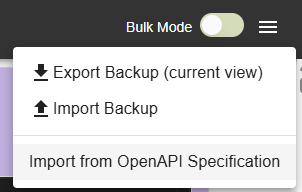
To open the OpenAPI import dialog, click the menu icon in the top right corner of the editor and select the OpenAPI import option:
Configuring the Import
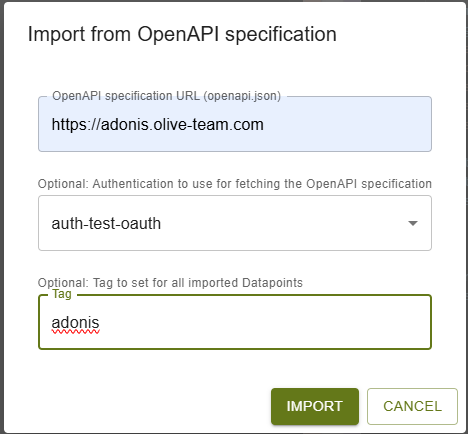
The OpenAPI import dialog allows you to specify the source and configure how the import is processed.
Required Settings
OpenAPI Specification URL
Enter the URL of the OpenAPI specification you want to import. This can be a public URL or a URL accessible from your OLIVE instance.
Optional Settings
Authentication
If the OpenAPI specification URL requires authentication (such as basic auth, bearer token, or API key), select an existing auth entry from the dropdown. This ensures the OLIVE platform can access the specification without exposing credentials.
Tag Assignment
Optionally specify a tag that will be automatically added to all generated datapoints and schema entries. Tags help organize and group related imports, making it easier to manage and identify which datapoints came from a specific OpenAPI import.
Import Result
After completing the import, the system generates:
- Datapoints – One datapoint per API endpoint defined in the OpenAPI specification
- Schemas – Corresponding input and output schemas for JSON content types. Schemas are only generated for endpoints with JSON request or response bodies. Other content types (such as XML) are not supported for schema generation.
All generated artifacts appear in your editor and are ready to use in connectors and workflows.